
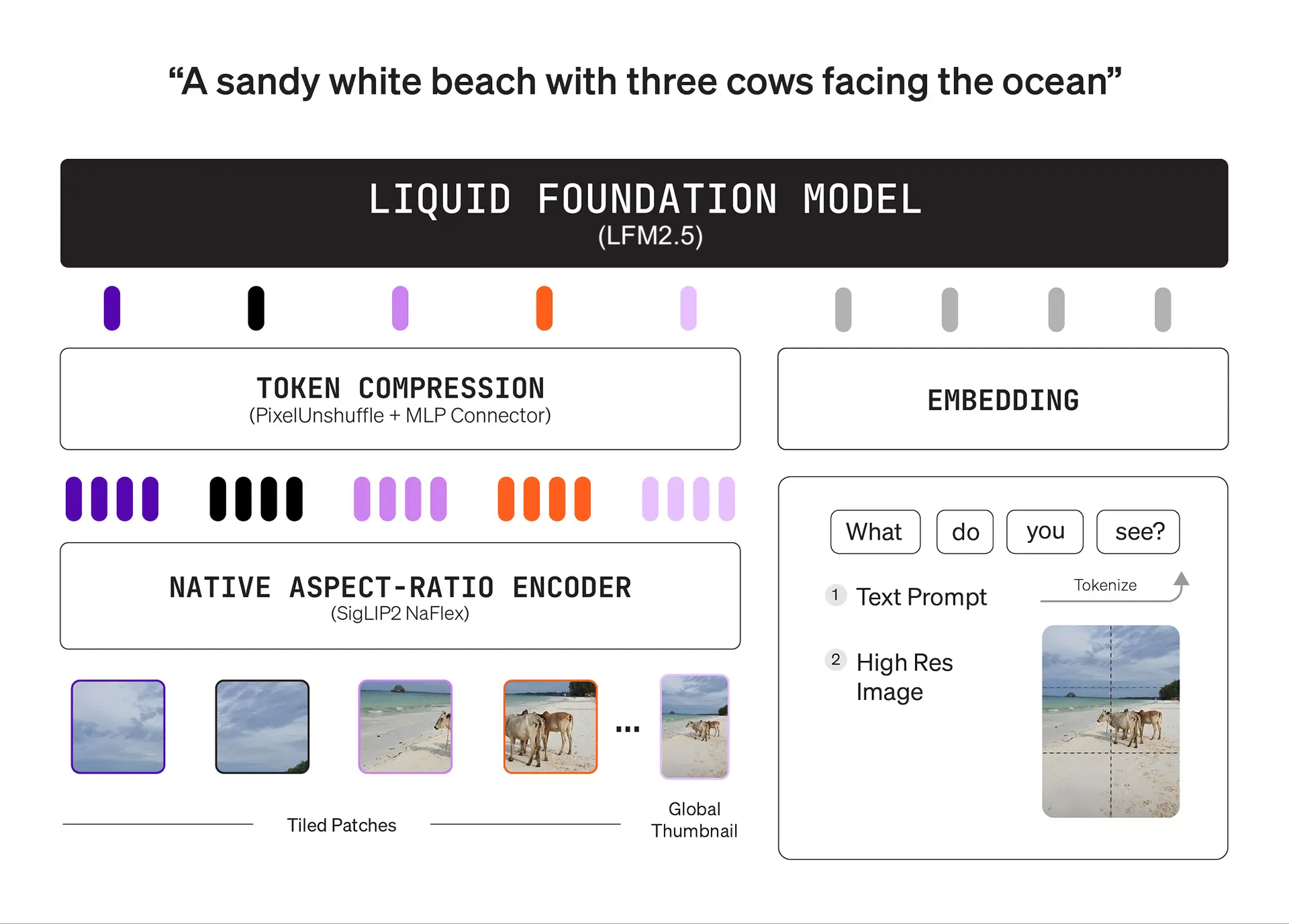
Liquid AI released LFM2.5-VL-3B on August 12, 2026. This new 3.1B open-weight vision-language model lets you analyze images and documents directly on your own hardware. You can grab it now through Hugging Face and Liquid AI Playground.
Built for speed, not long thinking
The model focuses on quick answers instead of slow multi-step reasoning. That low latency design makes it a practical fit for reading screenshots, running OCR on documents, and interacting with software interfaces.
Under the hood, the architecture pairs a 400M SigLIP2 NaFlex vision encoder with a 2.6B LFM2.5 backbone. Liquid AI trained it on roughly 34T tokens, packing four times more vision data than its previous model and a 128K vocabulary.
From day one, it supports widely used local runtimes:
- llama.cpp (via GGUF format)
- Apple MLX
- vLLM and SGLang
- ONNX
The performance numbers you should verify
Liquid reports that the model uses around 3 GB of memory. It runs at 228 tokens/s on an Apple M5 Max, 116 tokens/s on an AMD Ryzen AI Max+ 395, and 20 tokens/s on a Samsung Galaxy S26 Ultra. On an H100 GPU running vLLM 0.26 with BF16, Liquid claims about 11K output tokens/s under high concurrency with a 512×512 image.
The company also posted big benchmark jumps over the older LFM2-VL-3B:
- ScreenSpot-v2 desktop: 78.7 (up from 6.0)
- ScreenSpot-v2 mobile: 81.2 (up from 7.6)
- ToolSandbox: 59.5 (up from 26.4)
- RefCOCO average: 87.9 (up from 57.1)
All these speed figures and benchmark scores come directly from Liquid AI’s own internal tests. Nobody outside the company has verified them yet. Real memory use and accuracy can shift dramatically based on your exact quantization, prompt length, and image resolution.
Why local vision matters for your team
Running vision models locally solves two major headaches: cloud API bills and privacy risks. If you process sensitive invoices or private app screens, keeping data on-device eliminates security leaks. Speed counts here too. Fast local inference keeps screen-reading tools responsive.
It is small and fast.
Test it on your own hardware
Do not rebuild your pipeline yet. Start with a small pilot on a spare laptop or test machine.
Download the LiquidAI/LFM2.5-VL-3B weights and run them using llama.cpp or MLX. Feed the model five real UI screenshots and five scanned documents. Measure first-token latency, RAM usage, and answer accuracy against your current hosted vision model. If the numbers hold up on your hardware, you gain a cheaper, private vision tool that runs anywhere.